


Online Testing
DMAC Solutions enhances the online testing landscape with user-friendly software designed to improve the learning experience for both educators and students. Our comprehensive suite, featuring the TAG (Test Item Bank) and TEKScore, offers unparalleled flexibility, real-time data insights, and customizable assessments tailored to meet the needs of Texas Educators.

TAG - TEKS Assessment Generator
Online Test Item Bank. Create local assessments. Select from original content aligned to state standards or create your own. TEA Released items, Bluebonnet Learning and TEKS Resource System items are also available.
TEKScore
Local Assessments. A complete toolkit for administering and reporting on local assessments (aligned to TEKS, ELPS and/or AP). Students can take assessments online or on paper and teachers can analyze results in real-time using the powerful 1-click report feature from their dashboard.
Key Features: Local Assessments
Elevate Learning with Teacher-Friendly Solutions
It's Easy to Use!
Copy released TEA/OER materials, use TEKS-RS bundled content, or create your own in just a few clicks using the advanced filters and sorting options. Our tools are designed with the user in mind, making them easier to use than those offered by other providers. This ensures that educators can focus more on teaching and less on navigating complex software. Did we mention it's really easy to use?!?
Interactive Item Types
Many Interactive Item Types are available to assess students' knowledge in a variety of ways. This includes drag and drop, hot spots, advanced graphing items, and more!
Real-time Data
As soon as students click the Score button, Teachers have access to 1-click Reports through TEKScore. Analyze what strategies students used while testing, create custom groups and exports, and so much more. You can also manage online sessions, see all student activity, or reset/revoke access to online tests in real-time.
Expertly Developed Software
Our software is crafted in-house by a dedicated team of content specialists, all former educators, working alongside top-tier software developers. This collaboration ensures that our tools are not only effective but also intuitive and user-friendly, saving educators valuable time.
Stellar Support
Need help? We are here for it! Give the amazing Help Desk a ring if you’d like to interact with a real person (no chat bots here!), or contact us to set up personalized training for your school. We offer webinars 100% for free — to all users. Or, if self-paced is more your speed, we have videos and instructions available here.
Seamless Navigation
Our online testing platform helps students prepare for state testing and ensures that they are comfortable and confident when using various tools to showcase their learning.
-
Intuitive Student Testing Experience: Aligns with Texas standards and testing platforms for seamless navigation.
-
Flexible Accommodations & Tools: Customizable to meet individual student needs, such as Text-to-Speech, Texas Instruments and Desmos Calculators, Content & Language Supports, Lockdown/secure browser and more.
Streamlined Assessment Creation & Data Collection
With TAG (TEKS Assessment Generator), educators have access to 17 distinct item types, empowering teachers to create dynamic and engaging assessments. It's quick and easy!
-
17 Interactive Question Types: Expand beyond standard formats with multiple response, hot spot, equation editor, and more.
-
Advanced Online Filters: Locate content and export tests for online assessments in a few clicks.
-
Student Testing Supports: Facilitate accommodations such as text-to-speech, content clarifiers, and more, ensuring all students can demonstrate their knowledge effectively.
-
Comprehensive Data Analysis: Leverage advanced data visuals and detailed item analysis for informed instructional decisions.
TAG Item Types

Single Response
Students select one correct answer from a set of choices.

Multiple Response
Students select one or more correct answers from multiple options.

True/False
Students determine the validity of a given statement.

Short Text
Students type a brief string of text, such as a number, word, or phrase.

Inline Choice
Students select the correct answer from one or more dropdown menus in context with the surrounding text.

Inline Text
Students enter text in context with surrounding text.

Extended Text
Students write detailed responses, scored using a rubric.

Numeric Response
Students respond with appropriate numbers in formatted boxes.

Drag & Drop Inline
Students match choices to fill gaps in a passage.

Match Table Grid
Students match statements or objects to categories in a table.

Hot Text
Students highlight text within a passage to cite evidence.

Hot Spot
Students select specific areas of a graphic.
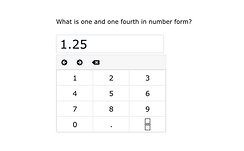
Equation Editor
Students use an equation editor to enter their answer.

Fraction Model
Students use a model
to complete a
fraction-based answer.

Graphing
Students solve one of
three different graphing item types (basic, intermediate
or advanced)

Number Line
Students plot points, rays, or line segments on a number line to complete the answer.

Bar Chart
Students select shaded regions to fill in bar segments to complete the answer.
Real-Time Insights with TEKScore

TEKScore, our powerful web-based scoring and analysis tool, delivers instant feedback and comprehensive reporting, allowing educators to make data-driven decisions promptly.
-
Instant Data Access: View and analyze student performance in real-time.
-
Detailed Reporting: Generate reports at the district, campus, class, teacher, or student level, utilizing quintiles, heat maps, and more for a deeper understanding of trends and achievements.
-
Versatile Data Collection Methods: Choose from online testing, plain paper answer documents, or manual entry to suit your needs.
Get Started with DMAC's TAG & TEKScore
Not using DMAC yet? Why not?! Contact us today to learn more and see how we can transform your assessment process. You'll be a DMAC Ninja in no time.